Studies show how much time planning and FP&A teams lose to data collection, validation and consolidation instead of analysis and decision support.

Excel isn't what costs you time. A formula is quick to write, a table quick to extend and an analysis quick to build. And with AI, it will become even easier.
Excel becomes expensive where many people, files and data sources come together. That is where the work around Excel begins: finding, copying, combining, validating, reconciling and updating data. Even with AI.
The scale of this effort is illustrated by the FP&A Trends Survey 2025.
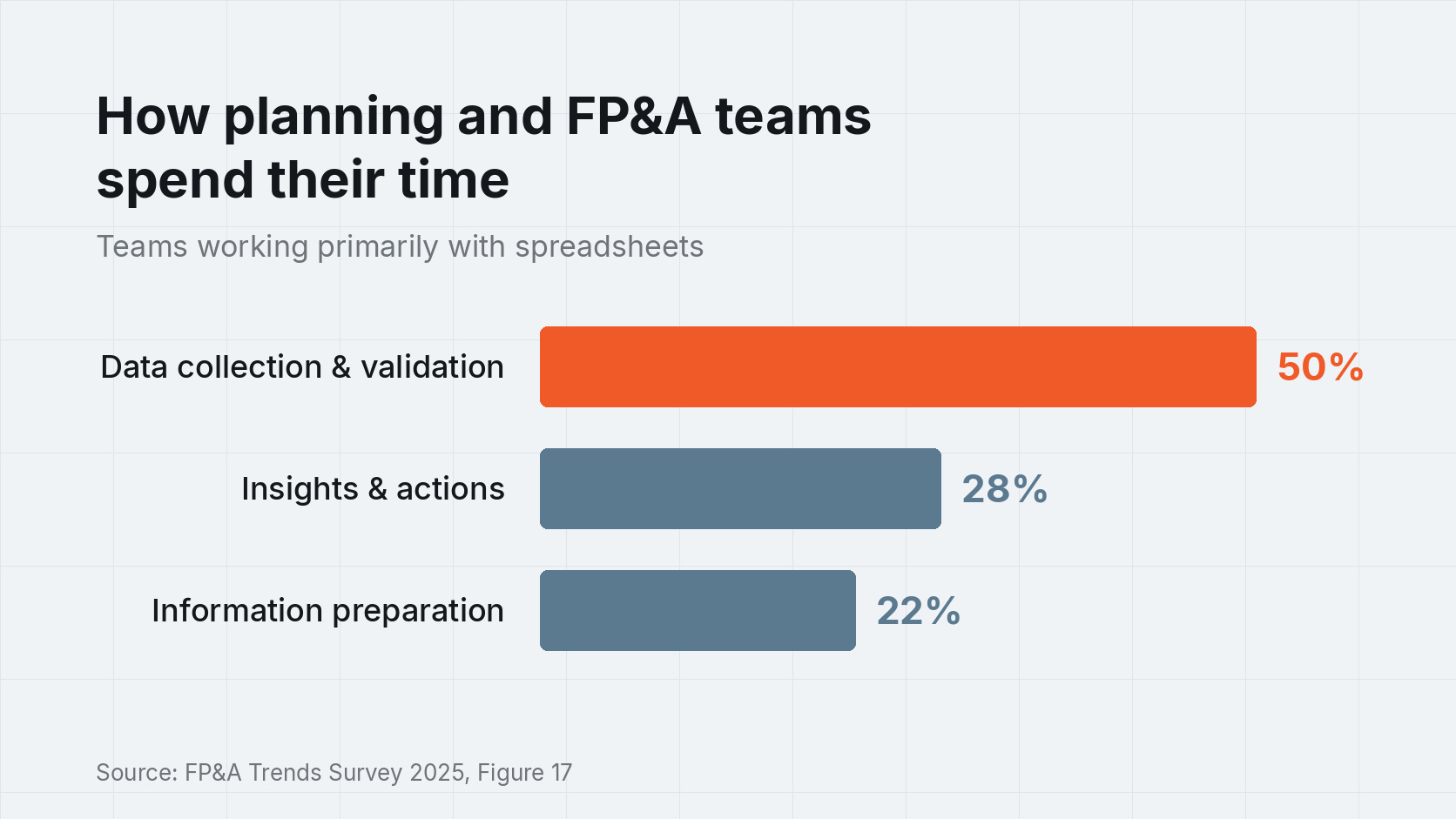
According to the survey, planning and FP&A teams that primarily use spreadsheets spend around 50% of their working time collecting and validating data. Only 28% of their time is available for generating insights and taking action.
That is remarkable. After all, the real work in planning, FP&A and corporate performance management should be to understand the numbers, identify developments and prepare decisions.
Not to copy numbers from one file to the next.
Excel is hard to beat for business and financial models. It is flexible, available almost everywhere and understood by business teams. Models can be developed and changed quickly.
The problem begins when a model becomes a business process. That introduces additional requirements:
All of this can somehow be organised with Excel. But as the number of files, people and processes grows, so does the manual effort.
A second study points in the same direction: according to the Datarails CFO Budgeting and Forecasting Survey, an average of 41% of FP&A processes consist of manual spreadsheet work. Finance teams spend around ten hours per week on this, including consolidation and error correction.
What this can mean per team:
10 hours per week × 46 weeks = 460 hours per year
For five teams that mainly work with Excel, that already adds up to:
5 × 460 hours = 2,300 hours ≈ €184,000 per year at a fully loaded cost of €80 per hour
This is an illustrative calculation, not a figure from the study. But it shows how quickly seemingly small manual tasks add up in large organizations.
The obvious conclusion might be: Excel has to go. That is often the wrong answer. The models themselves are usually not the problem. They contain a great deal of business knowledge built up over many years.
It makes more sense to retain Excel as a modelling tool and industrialise the processes around it.
Data no longer needs to be distributed and combined manually. Models can be used centrally. Users work from a shared data set. Permissions, processes and changes become traceable.
That preserves what Excel does well. And a platform takes over the part that Excel was never designed for.
Sources: FP&A Trends Group, 2025 FP&A Trends Survey; AFP, 2025 FP&A Benchmarking Survey; Datarails, CFO Budgeting and Forecasting Survey.
Whether you have a specific Excel model, a technical question, or an initial idea, talk to us about your project.
Contact us